



Need to connect BACnet and Modbus? The Weble WBox routes BACnet Modbus natively: one gateway speaks both protocols and maps data points in real time — no PC, no middleware, no cloud dependency.
The protocols
BACnet
BACnet (BACnet/IP, MS/TP) is the standard for building management systems and HVAC supervision.
BACnet driver →Modbus
Modbus (TCP/IP and RTU) connects PLCs, meters, variable-speed drives and countless industrial devices.
Modbus driver →Typical use case
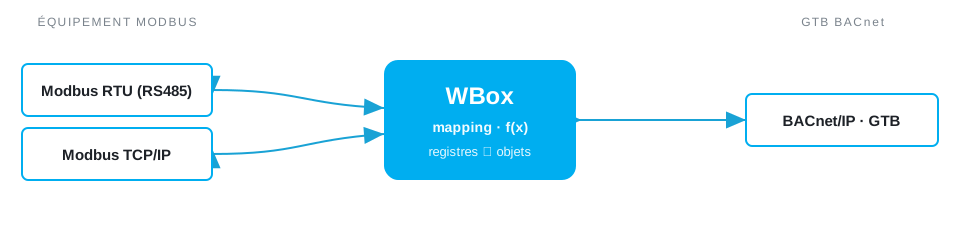
One of the most common retrofits: the BMS speaks BACnet/IP, but chillers, heat-meters, variable-speed drives, inverters and PLCs on site only speak Modbus. Replacing them is out of the question. The WBox integrates that field equipment into the BMS so it shows up as native BACnet — read and written from existing graphics, schedules and trends — and you extend an existing supervision system instead of bolting a second one beside it.
How the WBox bridges BACnet and Modbus
Activate the BACnet and Modbus drivers. Modbus holding and input registers map to BACnet objects: measurements to Analog Input/Value, states and commands to Binary Input/Value. The WBox handles scaling, word and byte order, and signed values per register, and exposes the result as discoverable BACnet objects — no per-point setup on the BMS side. Writes from BACnet propagate to Modbus holding registers, and a JavaScript step can clamp, scale or combine values before they cross.
Example mapping
A worked example, all on one gateway:
- Modbus holding
40001active power (×0.1 kW) → BACnetAnalog Input 20 - Modbus input
30005run status → BACnetBinary Input 3 - BACnet
Analog Value 8setpoint → Modbus holding40010
Route BACnet Modbus on your project
Find the right WBox gateway for your installation, or get in touch to validate your case.
Configure my gateway© 2026 Weble GmbH. All rights reserved. General conditions