
How to connect Modbus to MQTT

The bridge between your Modbus field equipment and the IoT/cloud world, explained simply.

Modbus and MQTT: two worlds

Modbus is a fieldbus protocol born in industry. It lets PLCs, meters, inverters and sensors exchange data through registers (numbered memory cells), in a master/slave model. It comes in two flavours: Modbus RTU (serial, over RS485) and Modbus TCP/IP (Ethernet). Simple and universal — but purely local.

MQTT is a messaging protocol designed for IoT. Devices publish messages (often JSON) to topics, and a broker distributes them to whoever has subscribed. Lightweight, real-time and cloud-oriented, it is the language of IoT platforms, dashboards and analytics tools.

Bridging them means getting data that is locked on a fieldbus out to a modern infrastructure — without changing the existing equipment.
Why bridge them

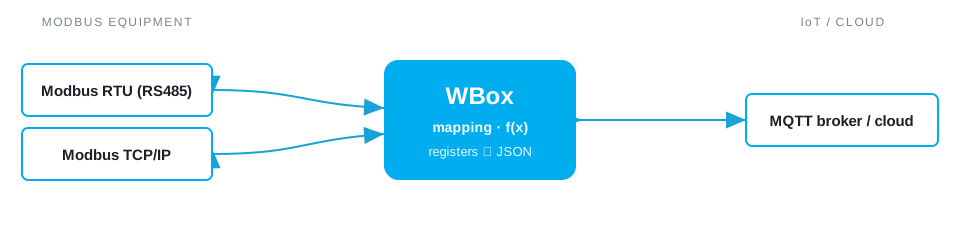
Bridging Modbus equipment to an MQTT broker for cloud upload

The real-world cases are many: pushing meters and PLCs to a cloud for tracking and billing, feeding real-time dashboards, aggregating several sites on a single platform, triggering alerts, or feeding an analytics tool / data lake. As MQTT is lightweight, it also suits low-bandwidth links (3G/4G).

How it works, step by step

  1. Read the Modbus registers — the gateway polls the device (master) or is polled (slave) and retrieves the relevant register values.
  2. Map each register to an MQTT topic — define where each value will be published (e.g. site/workshop/meter1/energy).
  3. Transform the value — scaling, unit change, data types and endianness handling, JSON formatting.
  4. Publish to the broker — the value is sent to the MQTT broker (private or public cloud), at the chosen frequency or on change.
  5. (Optional) Receive commands — by subscribing to a topic, the gateway can write a Modbus register from an inbound MQTT message (setpoint, command).

Best practices & pitfalls

  • Control the frequency — publish on change with a hysteresis rather than continuously, to avoid flooding the network or the broker.
  • Modbus types and endianness — a register is 16-bit; 32-bit values (float, int) span two registers whose order varies by manufacturer. Check it.
  • Structure the topics — a clear hierarchy (site / area / device / measurement) makes cloud-side processing easier.
  • Security — prefer MQTT over TLS with authentication; never expose an open broker.
  • Robustness — set an MQTT last will and automatic reconnection for unstable links.

Doing it with a WBox

The WBox gateway covers all these steps natively: Modbus RTU/TCP reading, drag-and-drop mapping, transformation in Blockly or JavaScript, MQTT publishing (broker or client) and command write-back. Everything is configured without heavy development. See the dedicated page: Modbus ⇄ MQTT gateway.

You need a WBox gateway, the Modbus driver and the MQTT driver. For meter reading, see also metering to the cloud.