


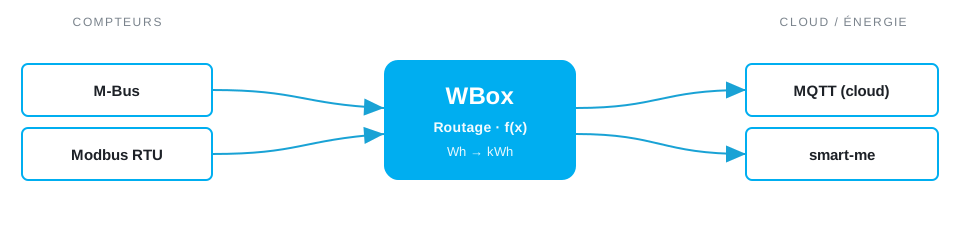
Need to connect M-Bus and MQTT? The Weble WBox routes M-Bus MQTT natively: one gateway speaks both protocols and maps data points in real time — no PC, no middleware, no cloud dependency.
The protocols
M-Bus
M-Bus reads heat, water, gas and electricity meters over a dedicated 2-wire bus.
M-Bus driver →MQTT
MQTT is the lightweight publish/subscribe protocol used by IoT devices and cloud brokers.
MQTT driver →Further reading: Wired vs wireless M-Bus: what is the difference? →
Typical use case
For cloud or IoT metering, the WBox reads wired or wireless M-Bus meters across a building and publishes their readings to an MQTT broker. Each meter becomes a tidy set of topics a metering platform, smart-me account or cloud dashboard can ingest for billing, sub-metering, benchmarking or alerts. No proprietary concentrator and no on-site PC: the gateway handles the readout and the gateway handles the upload.
In the field
Weble customers run this routing in production:
How the WBox bridges M-Bus and MQTT
Activate the M-Bus and MQTT drivers. The WBox polls each meter on a schedule, reads the records you select (energy, volume, power, error flags) and publishes them per meter as JSON on MQTT topics, with the last value retained for new subscribers. A Blockly or JavaScript step applies unit conversion (e.g. Wh to kWh), adds a timestamp or meter ID, or pushes the same values to a service such as smart-me in parallel.
Step by step
- Wire the field side — connect the meters through an M-Bus level converter.
- Enable the M-Bus and MQTT drivers on the WBox — licence-activated, no extra hardware.
- Map each point to a topic: a M-Bus value becomes
site/area/point(publish), with QoS and the retained flag set per signal. - Point the broker — host, port
8883, TLS and credentials — at your on-prem or cloud broker (AWS IoT, Azure, ThingsBoard, any MQTT 3.1.1/5). - M-Bus is read-only, so the flow is publish-only — confirm every meter reading live in the WBox point monitor.
Example mapping
M-Bus meters are read-only, published as retained topics:
- M-Bus meter
#7record0active energy (kWh) → MQTT topicmeters/heat/7/energy_kwh - M-Bus meter
#7record3volume flow (m³/h) → MQTT topicmeters/heat/7/flow - M-Bus meter
#7record5power (kW) → MQTT topicmeters/heat/7/power
Capacity & limits
- M-Bus — M-Bus drives up to 190 metering slaves through a Weble level converter (250 per the standard).
- MQTT — MQTT imposes no point limit — topics scale with your broker and network.
On the WBox, a driver licence enables the whole protocol — there is no artificial per-point tier to unlock. Capacity scales with the gateway model, from the compact S103 to the E413: you are bounded by the field bus, not by your licence.
Frequently asked questions
How do I do M-Bus meter reading over MQTT?
The WBox reads the M-Bus meters (wired or wireless) and publishes the readings over MQTT to your metering platform.
How do I find all the M-Bus meters?
The gateway can scan secondary and primary meter addresses directly from the web interface.
Do I need an M-Bus converter?
For wired M-Bus, yes: an RS485toMBus or EthernettoMBus converter. For Wireless M-Bus, a radio stick is enough.
Where is the data sent?
To any MQTT broker or metering platform; topics and payloads are configurable.
What you need
One WBox gateway with these two driver licences:
Route M-Bus MQTT on your project
Find the right WBox gateway for your installation, or get in touch to validate your case.
Configure my gateway© 2026 Weble Sàrl. All rights reserved. General conditions Product security