



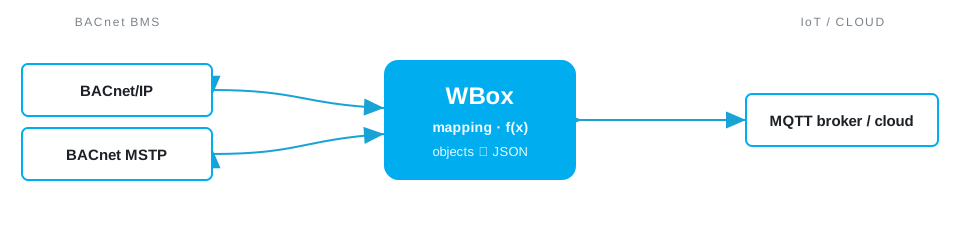
Need to connect BACnet and MQTT? The Weble WBox routes BACnet MQTT natively: one gateway speaks both protocols and maps data points in real time — no PC, no middleware, no cloud dependency.
The protocols
BACnet
BACnet (BACnet/IP, MS/TP) is the standard for building management systems and HVAC supervision.
BACnet driver →MQTT
MQTT is the lightweight publish/subscribe protocol used by IoT devices and cloud brokers.
MQTT driver →Typical use case
A BACnet BMS holds everything about a building, but BACnet does not travel well over the internet. To feed a cloud analytics platform, an energy-management service or a portfolio dashboard, the WBox streams selected BACnet objects to an MQTT broker and accepts setpoints and acknowledgements back. You get remote monitoring, fault detection and benchmarking across many sites, while the BMS keeps running exactly as before on site.
In the field
Weble customers run this routing in production:
How the WBox bridges BACnet and MQTT
Activate the BACnet and MQTT drivers. BACnet objects (Analog Input/Value, Binary) map to MQTT topics carrying JSON payloads; COV subscriptions publish only on change, so bandwidth and broker load stay low. Values received from MQTT are written to the BACnet present-value. A JavaScript step can batch several objects into one message, add metadata, or apply hysteresis before publishing — keeping the cloud feed clean and the gateway in full control of what leaves the site.
Step by step
- Wire the field side — join the BACnet/IP network, or the MS/TP segment over RS-485.
- Enable the BACnet and MQTT drivers on the WBox — licence-activated, no extra hardware.
- Map each point to a topic: a BACnet value becomes
site/area/point(publish), with QoS and the retained flag set per signal. - Point the broker — host, port
8883, TLS and credentials — at your on-prem or cloud broker (AWS IoT, Azure, ThingsBoard, any MQTT 3.1.1/5). - Subscribe a command topic to write back to BACnet, then watch every point live in the WBox monitor.
Example mapping
A worked example, all on one gateway:
- BACnet
Analog Input 5supply-air temperature → MQTT topicsite/ahu1/supply_temp - BACnet
Binary Input 2filter fault → retained MQTT topicsite/ahu1/fault - MQTT topic
site/ahu1/setpoint→ BACnetAnalog Value 10setpoint (write)
Capacity & limits
- BACnet — BACnet/IP scales to large object counts; BACnet MS/TP carries up to 127 master nodes per segment.
- MQTT — MQTT imposes no point limit — topics scale with your broker and network.
On the WBox, a driver licence enables the whole protocol — there is no artificial per-point tier to unlock. Capacity scales with the gateway model, from the compact S103 to the E413: you are bounded by the field bus, not by your licence.
Frequently asked questions
How do I publish BACnet data over MQTT?
The WBox reads the BACnet objects (IP or MS/TP) and publishes them as MQTT messages to your broker or cloud.
Which BACnet objects can be sent?
Analog and binary input/value, among others; point selection and payload formatting are configurable.
Is the bridge bidirectional?
Yes: an MQTT message can write a setpoint to a writable BACnet object.
Do I need proprietary hardware?
No: the BACnet and MQTT drivers are licence-activated on the same WBox gateway.
What you need
One WBox gateway with these two driver licences:
Route BACnet MQTT on your project
Find the right WBox gateway for your installation, or get in touch to validate your case.
Configure my gateway© 2026 Weble Sàrl. All rights reserved. General conditions Product security