


10’000+connected nodes
13cloud servers
∞simultaneous connections
9OEM servers
Work on your installations remotely, securely and with no complicated network setup.
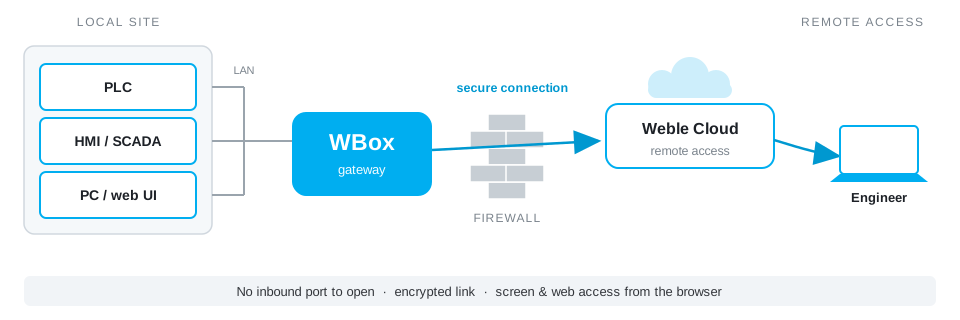
Reaching an installation remotely usually means heavy network configuration: a fixed IP address, open ports, firewall rules — slow steps that IT departments often refuse.
The WBox does it differently. It sets up a secure link to the Weble Cloud on its own, like any internet-connected device. You then reach your installation through the cloud, with nothing to open or reconfigure on the site network.
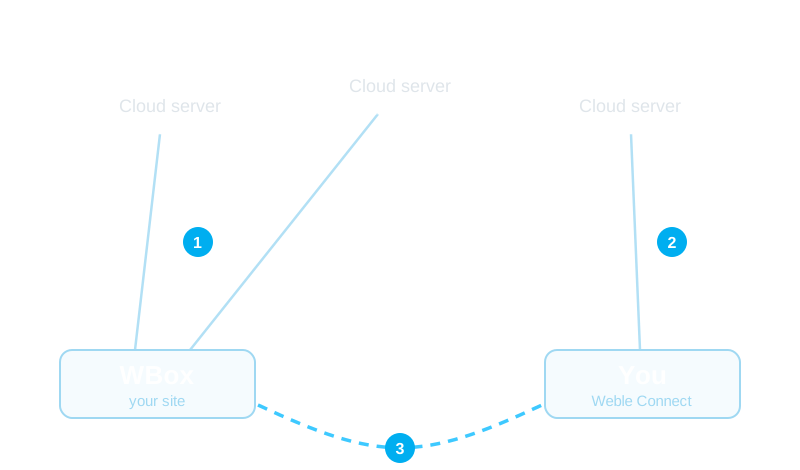
Reaching an installation remotely often means a monthly subscription, a fixed IP address or a central VPN server you have to host and maintain. The WBox takes a different route: it sets up its own secure peer-to-peer link, so the data path stays direct and your costs stay predictable.
The same VPN runs today on industrial and commercial installations, in Switzerland and abroad. See the use cases.
No central server: a mesh network where every link comes up automatically, over the best available path.
There is no central server behind Weble remote access: every gateway and every user is a node in an encrypted mesh network. Your site stays connected to several servers at once, you join the nearest server, and the link between the two comes up automatically.
The Weble VPN is a mesh network: every workstation, gateway and site can be granted a path to the others. You freely assemble the links your operation needs, and the topology evolves with it.
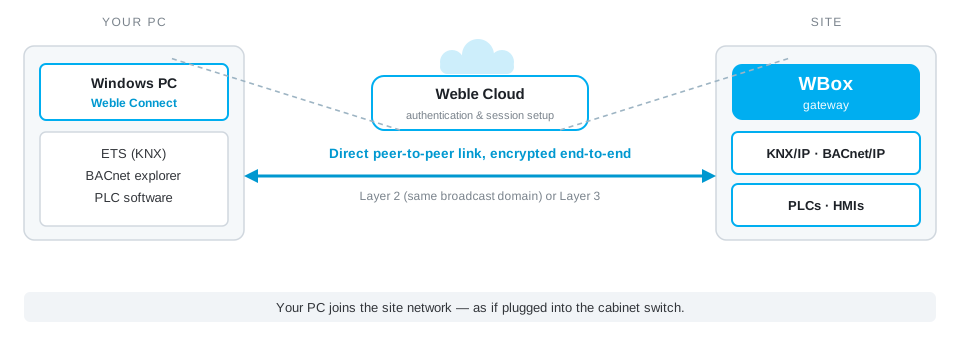
Each link is configured at Layer 2 (bridged: BACnet/IP, KNX IP and multicast discovery work natively) or Layer 3 (routed, for minimal overhead). Host groups and their security policies are managed from the platform.
Remote access is only worth having if you control who reaches what. The Weble VPN platform centralises this management: you grant, adjust and revoke rights without going back on site.
Weble remote access is not just for intervening: it keeps watch. The state of every gateway is tracked continuously, and the installation itself can raise the alert.
Once alerted, you act right away: the same secure link takes you to the faulty device, from the browser or Weble Connect. Full architecture on the Security & alarms page.
Nothing to install. Through the Weble Cloud’s built-in proxies, your browser directly shows a PLC’s screen (VNC), an industrial PC’s desktop (RDP), a device’s console (SSH) or its web interface (HTTP). Your engineer works as if standing in front of the cabinet — for commissioning as well as troubleshooting.
Where the browser shows you a screen, Weble Connect goes further: this Windows application puts your computer directly onto the remote network, at Layer 2 or Layer 3. Your usual engineering tools — ETS for KNX, a BACnet explorer, your PLC programming software — then talk to the on-site equipment as if you were plugged into the cabinet’s switch.
A single outbound connection is enough — the same one already used to reach the internet. No inbound opening is required, which reassures even the most demanding IT departments. The technical details are documented on the Weble wiki.
Weble’s remote access is also available as an OEM version: instead of relying on the Weble Cloud, you can host your own remote-access server and run the service entirely on your own.
You stay independent — full control over infrastructure and data, under your own brand. An ideal option for integrators and operators who want to keep the whole chain in their hands.
No. The WBox opens a single outbound connection to reach the network, exactly like any connected device. There is no fixed IP address to request, no port to open and no firewall rule to change.
Yes. In bridged (Layer 2) mode the remote link shares the same broadcast domain as the local network, so BACnet/IP, KNXnet/IP and multicast device discovery work just as if you were on site.
There is no cap. You can open as many parallel sessions as your team and your customers need — there is no subscription tier to unlock more connections.
No. Remote access is activated with a one-time licence per gateway. There is no monthly subscription and no billing by data volume, so the cost stays predictable even across a large fleet.
The link is peer-to-peer: once a session is established, your data travels directly between you and the installation rather than through our servers. And if you need to be fully independent of Weble’s infrastructure, you can host your own remote-access server with the OEM option.
No. The connection runs in your browser: the WBox brings a PLC screen, an industrial PC desktop or a device web interface to you over VNC, RDP or HTTP, with nothing to install on your machine.
Yes. The Weble Connect Windows application puts your computer directly on the remote network (Layer 2 or 3), so ETS, a BACnet explorer or your PLC programming software talk to the equipment as if you were on site. The Windows client is a free download; connecting uses your Weble credentials.
Yes. Rights are managed per user from the platform: everyone only sees the sites and hosts they are authorised for. Hosts are organised into groups with their own security policies, and access control can also be tuned device by device.
Each gateway’s link is monitored continuously: a loss of communication triggers an alert. On the installation side, the WBox turns thresholds and state changes into alarms, pushed by mobile app or SMS.
Nothing you would notice: each gateway keeps connections to several servers at once, and the link fails over automatically to another path. The mesh network does not depend on any single machine; redundancy is guaranteed by design.
The module is licence-activated and can be deployed on any WBox gateway.
© 2026 Weble Sàrl. All rights reserved. General conditions Product security