



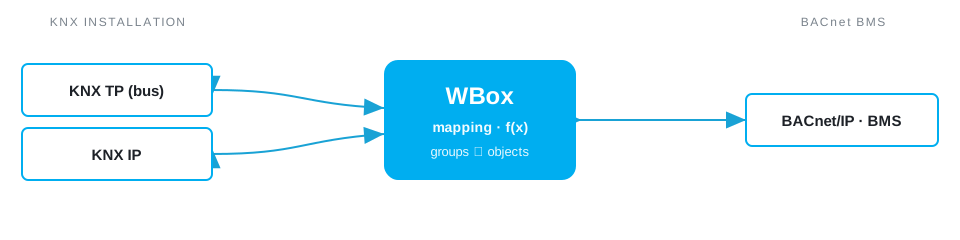
Need to connect KNX and BACnet? The Weble WBox routes KNX BACnet natively: one gateway speaks both protocols and maps data points in real time — no PC, no middleware, no cloud dependency.
The protocols
KNX
KNX is the worldwide standard for home and building control, running over twisted-pair, IP or RF.
KNX driver →BACnet
BACnet (BACnet/IP, MS/TP) is the standard for building management systems and HVAC supervision.
BACnet driver →Further reading: KNX vs BACnet: what is the difference? → · Integrating KNX into a BACnet BMS →
Typical use case
A common commercial-building split: lighting, blinds, presence and room controllers run on KNX, while the central BMS and the chiller/AHU plant speak BACnet/IP. The two worlds normally need a Windows gateway PC and per-project engineering to talk. The WBox replaces that PC — it sits on both networks at once, so the BMS reads and commands KNX rooms (occupancy, temperature setpoints, lighting scenes, blind positions) and KNX feedback flows straight into BMS graphics and trends.
In the field
Weble customers run this routing in production:
How the WBox bridges KNX and BACnet
Activate the KNX and BACnet drivers, then map points in the visual editor. Each KNX group address becomes a BACnet object: a temperature on DPT 9.001 to an Analog Input, a setpoint to an Analog Value, a switch or fault to a Binary Value/Input. The WBox exposes them as native BACnet objects the BMS discovers on its own — no extra database. Reads and writes propagate both ways; DPT-to-object-type conversion, scaling and any custom logic (Blockly or JavaScript) run on the gateway, no cloud dependency.
Example mapping
A worked example, all on one gateway:
- KNX
2/1/14room temperature (DPT 9.001) → BACnetAnalog Input 12(°C) - KNX
1/2/0setpoint (DPT 9.001) ↔ BACnetAnalog Value 5 - BACnet
Binary Value 7lighting command → KNX1/0/3(DPT 1.001)
Capacity & limits
- KNX — KNX exposes the installation's group objects; a TP line carries up to 64 bus devices, extended through lines, areas and KNXnet/IP.
- BACnet — BACnet/IP scales to large object counts; BACnet MS/TP carries up to 127 master nodes per segment.
On the WBox, a driver licence enables the whole protocol — there is no artificial per-point tier to unlock. Capacity scales with the gateway model, from the compact S103 to the E413: you are bounded by the field bus, not by your licence.
Frequently asked questions
How do I integrate KNX into a BACnet BMS?
With a WBox gateway running the KNX and BACnet drivers: it reads the KNX group addresses and exposes them as native BACnet/IP objects, which the BMS discovers as standard BACnet points — no intermediate PLC and no gateway PC.
KNX TP or KNX IP — which does the WBox support?
Both. KNX TP (twisted pair) via the WBox S485 KNX model, or KNXnet/IP on any WBox, depending on the installation.
Is the KNX to BACnet bridge bidirectional?
Yes. A BACnet write (a setpoint or command) is translated into a KNX telegram, and a KNX state is surfaced as a BACnet object — reads and writes propagate both ways.
Do I still need a Windows gateway PC or an intermediate PLC?
No. The KNX and BACnet drivers are licence-activated on a single WBox that sits on both networks at once. There is no Windows gateway PC to maintain and no intermediate PLC.
How many KNX group addresses and BACnet objects can one WBox handle?
From a few dozen on a small room controller to several thousand points on the larger models. Polling, COV and the refresh cycle are configurable, so you size the gateway to the project rather than to a licence tier.
Which WBox model do I need for a KNX-to-BACnet gateway?
For KNX/IP, any WBox with the KNX and BACnet licences. For KNX TP, choose the WBox S485 KNX, which has the twisted-pair interface on board. The configurator recommends the right model from your point count and interfaces.
What you need
One WBox gateway with these two driver licences:
Route KNX BACnet on your project
Find the right WBox gateway for your installation, or get in touch to validate your case.
Configure my gateway© 2026 Weble Sàrl. All rights reserved. General conditions