



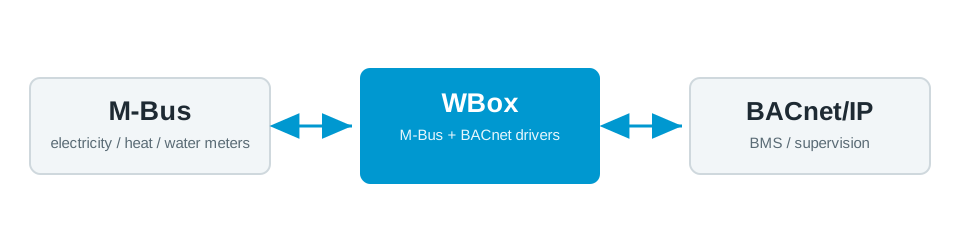
Need to connect M-Bus and BACnet? The Weble WBox routes M-Bus BACnet natively: one gateway speaks both protocols and maps data points in real time — no PC, no middleware, no cloud dependency.
The protocols
M-Bus
M-Bus reads heat, water, gas and electricity meters over a dedicated 2-wire bus.
M-Bus driver →BACnet
BACnet (BACnet/IP, MS/TP) is the standard for building management systems and HVAC supervision.
BACnet driver →Further reading: Wired vs wireless M-Bus: what is the difference? →
Typical use case
A BACnet BMS needs the meter data sitting on an M-Bus loop — district heating, cold and hot water, electricity sub-meters. Instead of a separate metering concentrator and a manual export, the WBox exposes each M-Bus meter as BACnet objects the BMS reads directly. This is the standard path for tenant billing, ESG and consumption reporting in commercial and multi-tenant buildings, with every reading time-stamped and trended in the same system.
Example deployment
How the WBox bridges M-Bus and BACnet
Activate the BACnet and M-Bus drivers. The WBox polls the M-Bus meters on a schedule, reads the records you select (energy, volume, power, flow and return temperatures) and maps each to a BACnet Analog Input with the correct unit and COV increment. The BMS then polls them like any native point. A JavaScript step can derive values — for example turning a kWh index into instantaneous power — before they appear on BACnet.
Example mapping
A worked example, all on one gateway:
- M-Bus meter
#3energy (kWh) → BACnetAnalog Input 30 - M-Bus meter
#3volume (m³) → BACnetAnalog Input 31 - M-Bus meter
#3flow temperature (°C) → BACnetAnalog Input 32
Capacity & limits
- M-Bus — M-Bus drives up to 190 metering slaves through a Weble level converter (250 per the standard).
- BACnet — BACnet/IP scales to large object counts; BACnet MS/TP carries up to 127 master nodes per segment.
On the WBox, a driver licence enables the whole protocol — there is no artificial per-point tier to unlock. Capacity scales with the gateway model, from the compact S103 to the E413: you are bounded by the field bus, not by your licence.
Frequently asked questions
How do I read M-Bus meters in a BACnet BMS?
With a WBox gateway running the M-Bus and BACnet drivers: it reads the M-Bus meters and exposes each reading as a BACnet/IP object, with no intermediate PLC.
How do I find all the M-Bus meters?
The gateway can scan secondary and primary meter addresses directly from the web interface.
Do I need an M-Bus converter?
For wired M-Bus, yes: a level converter (RS485toMBus or EthernettoMBus) powers the bus and adapts it to the gateway. For Wireless M-Bus, a radio stick is enough.
Is the M-Bus ⇄ BACnet bridge bidirectional?
Meter reading is read-only. On the same gateway, the WBox can also route BACnet setpoints to other protocols (Modbus, KNX) if the project requires it.
How many M-Bus meters can one WBox handle?
From several dozen to several hundred, depending on the converter (slave count) and the gateway model. Polling and caching are configurable to protect the bus.
What you need
One WBox gateway with these two driver licences:
Route M-Bus BACnet on your project
Find the right WBox gateway for your installation, or get in touch to validate your case.
Configure my gateway© 2026 Weble Sàrl. All rights reserved. General conditions Product security