



Need to connect KNX and MQTT? The Weble WBox routes KNX MQTT natively: one gateway speaks both protocols and maps data points in real time — no PC, no middleware, no cloud dependency.
The protocols
KNX
KNX is the worldwide standard for home and building control, running over twisted-pair, IP or RF.
KNX driver →MQTT
MQTT is the lightweight publish/subscribe protocol used by IoT devices and cloud brokers.
MQTT driver →Typical use case
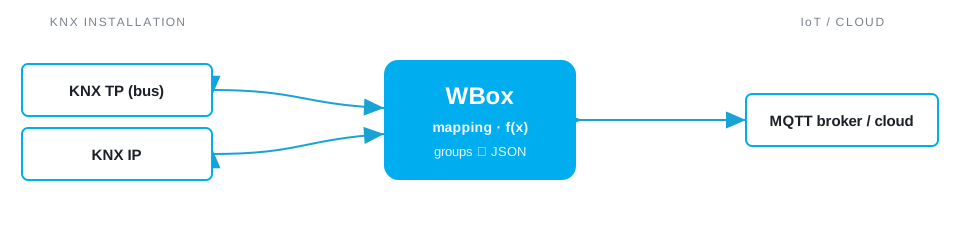
A KNX installation is rich in live data — temperatures, presence, energy, blind and light states — but locked inside the bus. To use it in an IoT dashboard, a Node-RED flow, Grafana or a cloud platform, the WBox publishes KNX states to an MQTT broker and writes commands back. You get building data in your analytics or automation stack, plus remote control, without exposing the KNX bus or installing a PC supervisor on site.
Example deployment
How the WBox bridges KNX and MQTT
Activate the KNX and MQTT drivers. Each KNX group address maps to an MQTT topic (e.g. site/floor2/room5/temperature); DPT values are decoded into clean JSON payloads and state is published as retained messages, so new subscribers get the last value immediately. Messages on command topics are written back to the bus. A JavaScript step can shape the payload, add units or a timestamp, or fan one source out to several topics — all handled locally on the gateway.
Step by step
- Wire the field side — connect KNX TP, or KNXnet/IP on an existing IP backbone.
- Enable the KNX and MQTT drivers on the WBox — licence-activated, no extra hardware.
- Map each point to a topic: a KNX value becomes
site/area/point(publish), with QoS and the retained flag set per signal. - Point the broker — host, port
8883, TLS and credentials — at your on-prem or cloud broker (AWS IoT, Azure, ThingsBoard, any MQTT 3.1.1/5). - Subscribe a command topic to write back to KNX, then watch every point live in the WBox monitor.
Example mapping
A worked example, all on one gateway:
- KNX group address
1/2/0room temperature (DPT 9.001) → MQTT topicsite/floor1/room12/temp - KNX
0/1/5lighting on/off (DPT 1.001) → retained MQTT topicsite/floor1/lights/12 - MQTT topic
site/floor1/room12/setpoint→ KNX1/2/3setpoint (write)
Capacity & limits
- KNX — KNX exposes the installation's group objects; a TP line carries up to 64 bus devices, extended through lines, areas and KNXnet/IP.
- MQTT — MQTT imposes no point limit — topics scale with your broker and network.
On the WBox, a driver licence enables the whole protocol — there is no artificial per-point tier to unlock. Capacity scales with the gateway model, from the compact S103 to the E413: you are bounded by the field bus, not by your licence.
Frequently asked questions
How do I connect a KNX installation to MQTT or the cloud?
The WBox reads KNX group addresses and publishes them over MQTT to your broker or cloud — ideal for monitoring KNX remotely.
KNX TP or KNX IP?
Both: KNX TP via the WBox S485 KNX model, or KNXnet/IP.
Is the bridge bidirectional?
Yes: an MQTT message can trigger a KNX telegram (lighting, blind or scene command…).
Do I need a PLC?
No: the KNX and MQTT drivers are licence-activated on the same WBox gateway.
What you need
One WBox gateway with these two driver licences:
Route KNX MQTT on your project
Find the right WBox gateway for your installation, or get in touch to validate your case.
Configure my gateway© 2026 Weble Sàrl. All rights reserved. General conditions Product security