Protocol routing

Connect KNX, BACnet, Modbus, MQTT, OPC UA and M-Bus on a single gateway — true inter-protocol routing, no PC, no cloud lock-in.

Try the live demo →Find my gateway


The WBox gateway natively routes any protocol to any other. Pick a source and a destination to see how:

Popular combinations

These are just the most requested pairs: with 52 drivers in the catalogue, the WBox routes over 2,600 source → destination combinations. Try yours with the selector above.

Same-protocol bridges & media converters

One route = 2 driver licences + 1 WBox gateway

Each driver is licence-activated on any WBox. Tell the configurator what you need to connect — it recommends the right model and licences.

Configure my gateway

All protocols & drivers

The WBox connects 50+ drivers, from building-automation protocols to industrial buses — each licence-activated on any gateway.

See all drivers →


How it works

In a building, every trade speaks its own protocol: comfort over KNX, the BMS over BACnet, field equipment over Modbus, utility metering over M-Bus, cloud and industry over MQTT or OPC UA. On their own, these networks don’t talk. Inter-protocol routing — the WBox’s core function — reads data points from one protocol and exposes them on another, in real time.

  • Everything runs on the gateway — enable the source and destination drivers, then map the points; conversion, scaling and logic execute on the WBox itself, with no PC, no middleware, no cloud dependency.
  • Any serialisable data — numeric values, strings, JSON objects; one-way or bidirectional routes.
  • As many routes as you need — a single gateway handles many routes at once, across all the protocols it supports.
  • Open, no vendor lock-in — integrate existing installations without proprietary hardware; the full stack also ships as a Windows application (PC, server, virtual machine).
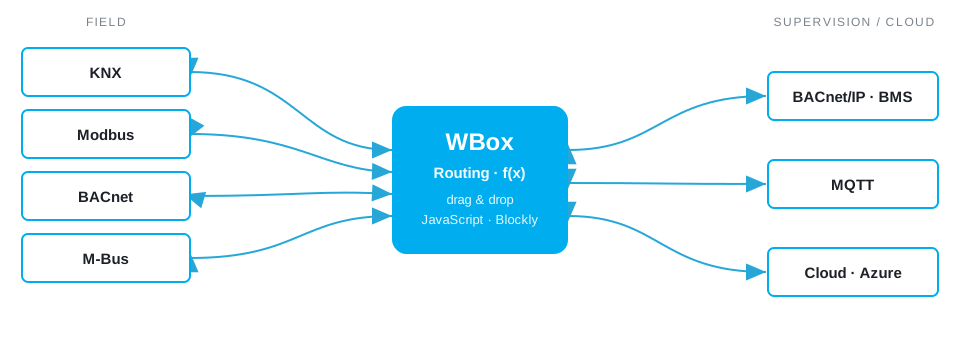
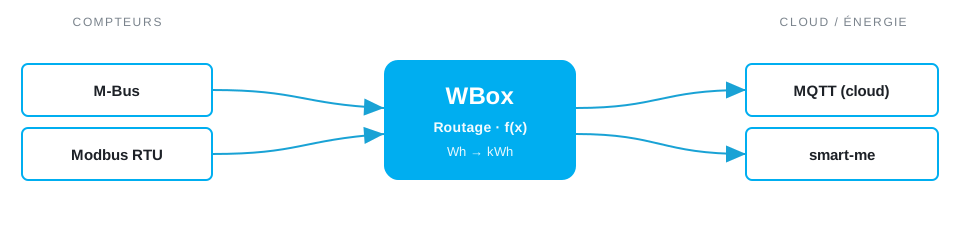
Diagram of Weble inter-protocol routing: from the field (KNX, Modbus, BACnet, M-Bus) to supervision and the cloud (BACnet/IP, MQTT, Azure)

Creating a route

Drag & drop, no code for simple cases.

Creating a route is instant: drag a source address onto a destination address between the two panels. On release, a popup opens to configure the route parameters. No line of code is needed for simple cases.

Routing direction

  • from source to destination (default)
  • reversed, from destination to source
  • bidirectional

Dynamic routing & transformation

JavaScript functions or Blockly blocks to go beyond simple routes.

Routing and transformation functions are written in JavaScript. Beyond static 1↔1 routes, you build dynamic routing: a function can compute the destination address on the fly (1→n mapping), select targets with a regular expression, or adapt behaviour based on the message content. Routing therefore adjusts in real time to the structure of your installation.

Value transformation

The value can be transformed before it is written. Left empty, the field routes the value as-is. Otherwise, three modes:

  • Constant — replaces the value with a fixed value (binary, numeric, string or JSON object).
  • JavaScript function — receives the routed value, processes it and returns the transformed value.
  • Blockly diagram — visual block programming, no coding skills needed (e.g. divide by 100 for a unit conversion).

Use cases

Three concrete examples of what routing does, day to day, on a real installation.

Energy metering to the cloud

Routing M-Bus and Modbus meter values to an MQTT cloud and smart-me

Your energy meters speak M-Bus (wired or wireless) and Modbus RTU. The WBox reads their registers, applies a unit conversion (Wh → kWh, in Blockly or JavaScript), then publishes each value to a cloud MQTT broker and/or to smart-me. You centralise remote metering and consumption tracking for a whole building — billing, sub-metering, energy optimisation — with no proprietary concentrator. Learn more →

SMS alert on a BACnet value

Sending an SMS or e-mail when a BACnet value crosses a threshold

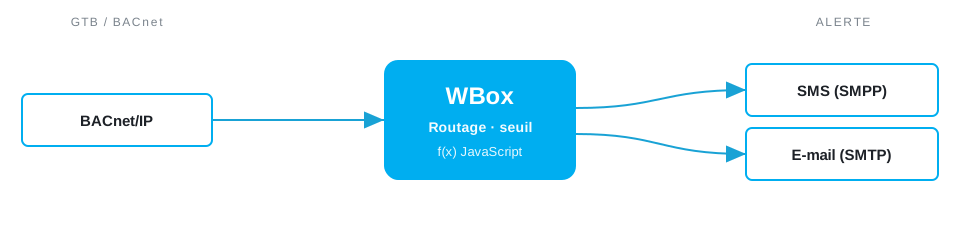
The BMS reports its values and alarms over BACnet/IP. A route monitors a BACnet object (temperature, fault, level); a JavaScript function evaluates a threshold and, when it is crossed, sends an SMS (SMPP driver) or an e-mail (SMTP driver) to the on-call team. Hysteresis prevents alert storms. Instant notification, with no third-party supervisor or dedicated alarm server.

Modbus → BACnet bridge

Modbus to BACnet bridge: exposing a Modbus device in a BACnet BMS

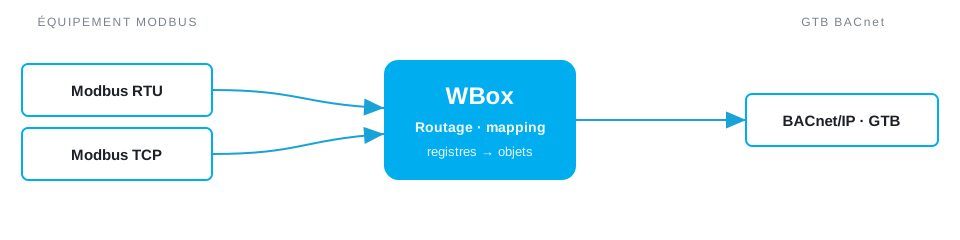
A PLC, inverter or meter only speaks Modbus (RTU or TCP), but your supervision runs on BACnet. The WBox reads the Modbus registers and exposes them as native BACnet objects (analog / binary value): the BMS discovers and reads them like any other BACnet device. You integrate non-BACnet equipment into an existing supervision system, without replacing it. Learn more →

Real-world examples from our wiki

Routing has virtually no limits: any data point from one protocol can be transformed and written to another. Below is a selection of real-world examples documented on our wiki — the list is far from exhaustive.

  • BACnet VAV regulation — advanced routing combining several sources to drive a variable-air-volume box.
  • Counter → instantaneous — convert a rising energy-meter index into an instantaneous consumption value (power).
  • Cross-gateway email alert — send an email (SMTP driver) when another gateway runs into trouble and restarts.
  • Landis+Gyr E450 meters — reading E450 electricity meters (in production at Romande Energie).
  • Siemens RVD25x/RVD26x controllers — full M-Bus support: temperatures, pump states, valve positions, diagnostics.
  • Modbus watchdog — monitor a register and reset it automatically (e.g. if the value drops below 350, write 500 back).
  • Routing watchdog — use a JavaScript gate to check that a value keeps being routed and updated.
  • Dynamic 1→n mapping (Airthings) — a destination function returns the list of BACnet objects matching an MQTT source address.
  • BACnet → MQTT — route a BACnet object and its properties into lightweight JSON MQTT messages, ideal for IoT.
  • Unit conversion — divide by 1000 to turn Wh into kWh, in Blockly or JavaScript.

Traffic control & reliability

A hysteresis limits the traffic caused by frequent updates, a deactivation delay prevents loops, and a consistency check (formats and value types) protects your equipment — a route that overloads the system can be disabled automatically.